


With a number of open source and commercial apps for 3D scanning with the Microsoft Kinect, it has become a favorite tool for DIY 3D printed portrait booths. When the new Xbox One Kinect was to be released, there was a fear that the new, improved sensor, which lacked a USB cable, would not offer the same 3D scanning capabilities. This week, those fears have been addressed with a $49 adapter that allows the Xbox One Kinect to connect via USB to Windows 8 and 8.1 machines.

Though it looks like an added cost, the previous Kinect is priced at $199.99, while the new Xbox One device is only $149.99. With the adapter, this makes the new Kinect the same price as the old, if you plan to use it with your computer. Microsoft is hoping that this will allow users to create Kinect-enabled apps for Windows, to add to the commercial apps already in the Windows Store, which include: Nayi Disha, a collection of kinetic learning games for kids; YAKiT, a gesture-based animation app; and 3D Builder, Microsoft’s own 3D modeling and printing app, previously covered on 3DPI.
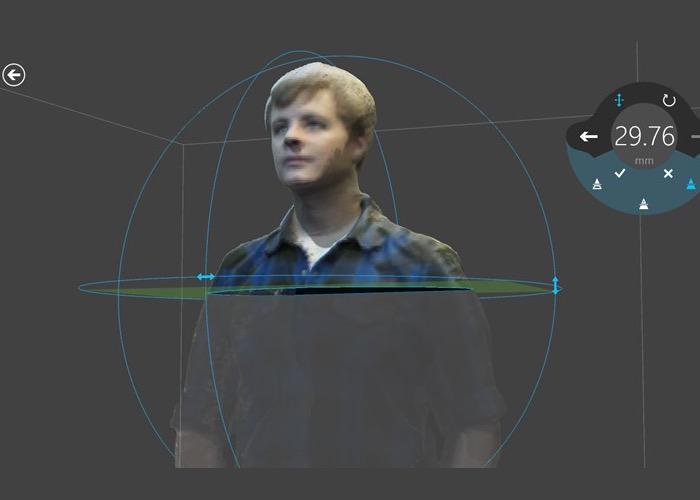
The Kinect gives 3D Builder added functionality, in that it allows users to scan people and things for 3D printing. As you can see in the video below, the app performs full color scans, which can then be 3D printed directly from 3D Builder on your own 3D printer or through the company’s partnership with 3D Systems. Within the app, models can be cleaned up, repaired, embossed with text or images, or merged with or subtracted from other shapes.
Partner director of program management in Microsoft’s Operating System Group, Scott Evans, believes that using the new device with Windows is about as seamless as with the previous generation of the sensor. It automatically downloads and integrates the necessary drivers and will work in the same way as the original Kinect, without a software developer’s kit. Evans says, “It’s super-accessible from a consumer point of view.”
The Kinect adapter is now available online and in retail outlets, while the 3D Builder app can be downloaded for free at the Windows Store. Microsoft is also releasing its Kinect SDK 2.0 for Windows developers, so you can get to writing your new Kinect-based apps for the Windows store.