Spend less time fixing files. Discover smarter workflows at AMA: Software 2026.
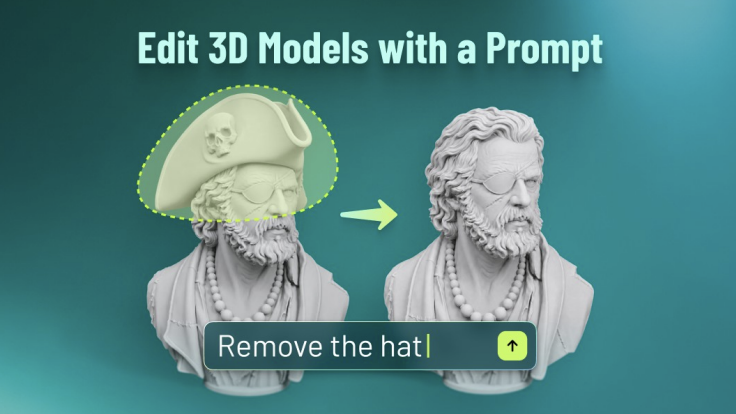
AI 3D generation company Meshy has launched Meshy Edit, a tool that changes one selected region of a 3D model from a text prompt while leaving the rest of the geometry untouched. Users mark the area they want to change, describe the edit in a sentence and receive a new model in roughly a minute, ready to send to a slicer. The feature runs on a new model Meshy built in-house and trained specifically for local edits. It became available on October 16, 2026 to all registered users, at 20 credits per edit.
The tool targets a common problem in AI-assisted 3D printing. Until now, makers who wanted to drop a hat from a figurine or swap an accessory on a designer toy had two options: regenerate the whole model, which also alters the parts they wanted to keep, or fix the mesh by hand in software such as Blender before slicing. Meshy says that manual route can take hours for a single detail, while an edit in its tool takes minutes.
Selecting, then describing
Every edit has two steps: mark the region, then write the change. The Lasso is the main selection tool. Drawing a loop around a part on screen selects that whole component, including the surfaces on its sides and back that the user cannot see. A Brush with adjustable size paints over visible surfaces to refine the boundary. A Lasso Eraser and a standard Eraser trim unwanted areas, and Clear All resets the selection. Holding Alt (Option on a Mac) while dragging rotates the model during selection.
The prompt can be as short as “remove the hat”, and users can attach up to five reference images of up to 20 MB each. If nothing is selected, the edit applies to the entire model. Jobs run in the background, so users can leave the page and get a notification when the result is ready.
Meshy recommends selecting slightly more than needed, including neighbouring areas, because the system blends the edges after submission. Concrete shape words such as “thicker” or “round” work better than vague requests such as “make it look better”. Since every attempt is saved as a separate version, running the same edit several times and picking the best result is part of the intended workflow.
From edited model to slicer
An edit never overwrites the source. Each one produces a new model, and the original stays in the user’s assets for side-by-side comparison. The edited version can be edited again, downloaded, or kept inside Meshy’s print workflow, which includes a printability check and an option to add a base. From there, a single click sends it to slicer software, including Bambu Studio, Snapmaker, Flash Studio and xTool Studio. Users can open the tool from the Edit button in the toolbar beneath the model viewer, or from the Edit card at the top of the Post-Processing panel in the Print module.
Meshy’s examples are mostly about 3D printing: removing a part from a figurine, adding or completing a detail on a tabletop miniature, and swapping accessories on designer toys or merchandise. The company also expects game developers and character artists to use it to change a prop or accessory without disturbing the rest of a character.
Geometry only, for now
Meshy Edit currently changes geometry only. It does not edit textures or colours. Textured models can still be edited, but the tool automatically switches to the untextured version, and the result comes back without textures.
It only works on high-poly models generated with Meshy 6 or Meshy 7.1, including Ultra 2K output. Meshy 7.1 Ultra 4K models, low-poly models and models from earlier Meshy versions are not supported yet. The same goes for uploaded files, split results, rigged or animated models, and models still being generated. That means makers cannot yet use the tool on STL files from other sources.
Meshy is open about uneven results. Worn accessories such as hats and glasses, and swaps between similarly shaped objects, are the most consistent edits, so the company suggests them for a first test. Floating handheld objects and edits that substantially change a shape are less predictable. Small unintended changes can sometimes appear near the edge of the selection, and the output may occasionally include geometry that does not match the prompt. Meshy says adjusting the selection or rewording the prompt and retrying usually fixes it.

Fixing the last step before the print bed
Meshy Edit is the latest piece in Meshy’s effort to own every step from prompt to printed object. In March 2026, Meshy’s generation engine was built into Bambu Lab’s MakerWorld, so users could turn a photo into a print-ready file in the browser. A month later, Meshy connected its tools to Formlabs’ Form Now print-on-demand service. In July, alongside its nearly $400 million Series B, it added Auto Split, which breaks a model into watertight, reassemblable parts and arranges them on the print bed. Local editing closes a remaining gap. Until now, a model that was almost right still had to be regenerated or fixed by hand.
Other platforms are targeting the same pipeline. Womp launched a generative AI platform where users generate a model from text or an image and refine it in a browser workspace. Its print mode handles hollowing and printability checks, and users can order the physical part from Womp’s own stereolithography service. Autodesk introduced Wonder 3D to produce editable 3D assets from text and images, bringing the idea of AI output that can be changed after generation inside an established design suite.
Researchers are tackling editability as well. NVIDIA’s PartPacker generates editable, part-based models from a single 2D image, with STL and 3MF export for multi-material printing. That separates individual components at generation time, while Meshy Edit lets users change any one of them afterward. Generating a model is no longer the hard part; correcting it is. Meshy Edit moves that correction step out of Blender and into a text prompt.
Register now for AMA: Software 2026. Join 3D Printing Industry on 22 October for expert presentations, panel discussions and live audience Q&A exploring the software shaping additive manufacturing. Register here.
To stay up to date with the latest 3D printing news, don’t forget to subscribe to the 3D Printing Industry newsletter or follow us on LinkedIn.
Explore the full Future of 3D Printing and Executive Survey series from 3D Printing Industry, featuring perspectives from CEOs, engineers, and industry leaders on the industrialization of additive manufacturing, 3D printing industry trends 2026, qualification, supply chains, and additive manufacturing industry analysis.
Featured image shows Meshy Edit allowing for prompt-based, localized edits to AI-generated 3D models before printing them. Image via Meshy.